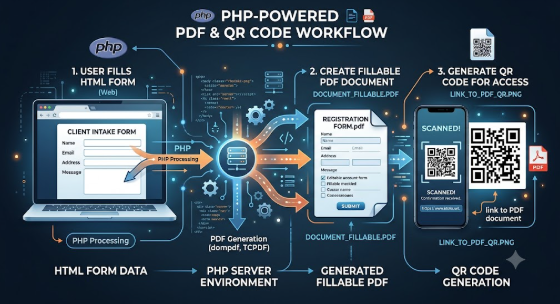
How to Create a Fillable PDF From HTML: A Complete Guide for Designers & Businesses
You’ve built your form layout in HTML, finalized your design, and polished the user flow—but now you need something more versatile: a fillable PDF that users can download, complete offline, and share easily.
Turning HTML into a fillable PDF sounds technical, but with the right approach, it becomes a smooth, repeatable, and professional process. Whether you’re a developer, a business owner, or a designer, your PDF form should work flawlessly and reflect your brand.
There’s a simple method to creating the perfect HTML-to-fillable-PDF experience, and it revolves around four key steps. Let’s walk through them.
1. Ask Yourself a Few Key Questions
Before you begin converting HTML into a fillable PDF, it’s important to clarify what you want your final document to achieve.
Think about questions like:
- What kind of experience should users have when filling out my PDF?
- Will the PDF need advanced elements like dropdowns, signature fields, or auto-calculations?
- Who will use this form—employees, clients, or general customers?
- Does my form need to match existing branding or website design?
These questions help define the functionality and style your fillable PDF requires.
2. Focus on Structure: Designing the HTML Form
Much like choosing the right font for a logo, the layout of your HTML form sets the tone of your document.
Your HTML should be:
- Clean
- Well-structured
- Responsive
- Organized with sections
Example structure:
<div class="form-group">
  <label>Full Name</label>
  <input type="text" />
</div>
<div class="form-group">
  <label>Email</label>
  <input type="email" />
</div>
A clean HTML form ensures that when it’s converted into a PDF, everything aligns perfectly—no misaligned fields, no broken layout.
3. Choose the Right Style: Your PDF’s Look & Feel
Just like choosing a logo style, your PDF design should match your brand identity. Your style must be consistent, readable, and visually appealing.
Color Choices Matter
Colors in PDF forms influence how users perceive your brand.
Here’s what common colors communicate:
- Blue: Trust, reliability
- Black: Professionalism, authority
- Green: Growth, clarity
- Yellow: Optimism, friendliness
- White: Cleanliness, simplicity
Even small choices—like border color or header shading—can change how users feel about your form.
Branding Tips:
- Use your logo in the header
- Keep spacing comfortable
- Use consistent fonts
- Avoid heavy backgrounds (PDFs should remain printer-friendly)
4. Pick the Right Conversion Method (The Most Important Step)
Just as logos come in several styles, there are multiple ways to convert HTML into a fillable PDF. Each tool has strengths depending on your needs.
Popular Options:
Client-Side (Browser Based)
- pdf-lib
- jsPDF
- html2pdf.js
Ideal for web apps and instant downloads.
Server-Side Tools
- DomPDF (PHP)
- mPDF (PHP)
- Puppeteer (Node.js)
- PDFKit (Node.js)
These are perfect if you want automated PDF generation from a backend system.
Interactive Fields You Can Add
- Text inputs
- Dropdown menus
- Checkboxes
- Radio buttons
- Signature fields
- Auto-calculation fields
- Save / Reset / Print / Submit buttons
Choosing the right method ensures your PDF works smoothly across devices.
Why Fillable PDFs Matter for Your Business
A well-designed fillable PDF created from HTML can:
- Streamline data collection
- Look professional and consistent
- Reduce user errors
- Enable offline form completion
- Improve customer experience
- Keep your layout exactly as designed
Whether you're handling applications, onboarding, surveys, medical forms, or agreements—HTML-to-PDF conversion delivers flexibility and professionalism.
Final Thoughts
Creating a fillable PDF from HTML may seem technical at first, but with the right structure, style, and tools, it becomes a seamless part of your workflow. Your form will not only look polished, but also function effortlessly for anyone who downloads it.
If you're ready to take your business forms to the next level, mastering HTML-to-fillable-PDF conversion is one of the smartest investments you can make.